

Kevin Hayler: Professional Wildlife artist, author, and traveler.
Most artists and creatives are looking for ways to monetize their work. Could Patreon membership help? It has been a popular platform for years, but is Patreon worth it? Let’s take a closer look at Patreon and how it can benefit both Patreon creators and their Patrons.
Patreon is worth it for creators and patrons alike. Artists can boost their monthly income substantially by serving their loyal fans with exclusive access to content. Patrons can show their appreciation, and support, with modest non-commital monthly payments, and join a private online community of like-minded people.
In this post, we will go over the pros and cons of Patreon for artists and creators, so let’s get to it.
Disclaimer: When you buy something via my affiliate links I earn from qualifying purchases and sometimes earn a commission, at no extra cost to you. I am an Amazon Associate among others. I only recommend trusted sites.
What is Patreon?
Patreon is a membership platform that offers an opportunity for content creators to connect with their audience in a more personal way.
It enables creators, such as musicians, writers, podcasters, and visual artists, a way to generate regular income by providing exclusive content and rewards to their loyal fans.
Unlike other crowdfunding platforms, Patreon is based on a recurring subscription model rather than a one-time fundraising event.
How Does Patreon Work?
Patreon is a membership platform where creators set up a Patreon page and offer various membership tiers to their supporters. Each tier is priced differently according to the benefits on offer.
Here’s a basic breakdown of how Patreon works for creators:
- The Creator Sets Up a Patreon Page: When a creator signs up on Patreon they create a page to showcase their work and describe what they have to offer their patrons
- Exclusive content: Creators provide extra or unique content exclusively for their patrons. This could be additional tutorials, behind-the-scenes glimpses, or works in progress, among other things.
- Early access: Patrons typically receive early access to new content before it’s released to the public.
- Direct interaction: Many creators offer the chance to interact more directly through things like live stream chats, Q&As, coaching, and more.
- Ongoing Support: Patrons’ monthly payments continue as long as they choose to support the creator. Creators can rely on this recurring income to fund their ongoing projects, cover expenses, or dedicate more time to their creative work.
In essence, Patreon is a great way for creators to generate a consistent income while providing added value to their most dedicated audience members. Win-win.
Here’s a simple breakdown of how Patreon works for Patrons:
- Patrons Choose Membership Tiers: Patrons visit the creator’s page and choose a membership tier that suits their interests and budget. Each tier offers different benefits and access to more content.
- Monthly Pledges: Patrons commit to supporting the creator by making a recurring monthly payment, usually through a credit card or PayPal.
The payment amount depends on the chosen membership tier. Payments are non-commital, but most Patrons subscribe for about 6 months. - Access to Exclusive Content: In return for their support, patrons gain access to exclusive content as I described before, bonus material, and/or interactive experiences that the creator shares only with their patrons.
- Building a Community: Patreon provides a space for creators to engage with their patrons through comments, direct messages, live chats, or dedicated forums. This helps foster a sense of community amongst Patrons and allows creators to interact with their most dedicated fans.
How Do You Join as a Patreon Creator?
Becoming a Patreon creator involves a few easy steps. Here’s how it goes:
- Create a Patreon account: The first thing you’ll need to do is sign up for an account on the Patreon platform with your name, email, and password.
- Set up your Patreon page: This involves designing your page to reflect your brand and the type of content you produce. A compelling Patreon profile is a great way to attract more patrons. First impressions count.
- Create your membership tiers: Decide what perks or exclusive access you’ll offer at each membership level. You can have as many or as few tiers as you want, but keep in mind that more tiers may mean a lot of work. Three tiers will suffice for most people.
How Do You Join Patreon as a Patron?
Subscribing to a content creator on Patreon is an equally simple process:
- Find the Creator’s Patreon Page: After signing up, the first thing you have to do is find the Patreon page of the creator you wish to support.
- Choose a Membership Tier: Creators offer different membership tiers with varied perks. Pick one that suits you and your budget.
- Enter Payment Information: You’ll need to enter your credit card details or link a bank account for the monthly payments.
- Enjoy Exclusive Content: Once your payment is processed, you’ll gain access to the perks associated with your chosen tier.
I joined Patreon to follow Stephen Bauman.
This is one of his courses (on Proko)

These reviews will interest you:
- Are Proko Courses Worth It? A Review – Pros and Cons
- Is Selling Art on eBay Worth it? Pros and Cons
- Is Udemy Worth it? Pros and Cons For Creatives
- Is Domestika Worth It? The Pros and Cons
- Is Skillshare Worth It? Pros and Cons for Artists
- Is Redbubble Worth it? Pros and Cons For Artists
- Is Selling on Etsy Worth it? Pros and Cons
- Is Print on Demand Worth it? The Pros and Cons of a POD Business
How Much Does Patreon Cost?
As a creator, everything is free to set up and charges apply only when you start to earn money.
Creators using Patreon can choose between different pricing tiers depending on the services and tools they require. These tiers typically come with a platform fee, deducted from the creator’s earnings.
Additionally, a small processing fee is deducted from each payment transaction.
What Are The Patreon Pricing Plans for Creators?
For creators joining Patreon today, there’s a single Standard Plan. This plan simplifies the old tiered system and gives all new creators access to the tools they need to build and grow their membership business.
Patreon charges 10% of your monthly income, plus standard payment processing fees (typically 2.9% + $0.30 in the U.S., slightly higher internationally depending on currency and payment method).
Features Include:
- Hosted Creator Page: A central hub where you share exclusive content, updates, and interact with patrons.
- Membership Tiers: Create unlimited tiers with different benefits and prices to suit your audience.
- Analytics & Insights: Track performance, understand your audience, and optimize your membership strategy.
- App Integrations: Connect with tools like Discord, Crowdcast, and more to streamline your workflow.
- Patron Communication Tools: Stay connected with your supporters through posts, messages, and email updates.
- Learning Hub: Access workshops, guides, and resources to help you grow your membership.
- Merch for Membership (Optional Add-On): Reward patrons with physical merchandise, with Patreon handling production and shipping.
What are the Processing Fees for Creators?
In addition to the platform fees charged by Patreon, creators also need to account for payment processing fees. These fees can vary depending on the patron’s location and the currency in which the payment was made.
Here’s a comparison table for a quick overview:
| Country/Region | Currency | Standard Rate | Micropayment Rate |
|---|---|---|---|
| United States | USD | 2.9% + $0.30 (over $3) | 5% + $0.10 ($3 or less) |
| European Union | EUR | 3.4% + €0.35 (over €3) | 5% + €0.15 (€3 or less) |
| United Kingdom | GBP | 3.4% + £0.35 (over £3) | 5% + £0.15 (£3 or less) |
| Canada | CAD | 3.2% + CA$0.35 (over CA$3) | 5% + CA$0.10 (CA$3 or less) |
| Australia | AUD | 3% + A$0.30 (over A$3) | 5% + A$0.10 (A$3 or less) |
Please note that these rates are subject to change. It’s always a good idea to check Patreon’s official website for the most up-to-date information.
How Much Does Patreon Cost for Patrons?
The cost for patrons depends on the creators membership tiers.
The payment is usually a monthly subscription, although some creators offer a yearly deal, or choose to charge a fee per video.
When subscribing to a creator on Patreon, patrons typically incur two types of costs:
- Pledge Amount: This is the amount of money that a patron chooses to give to a creator. The minimum amount is $1, the default amount at $5, or it can be any amount the patron chooses. The pledge amount is determined by the tier level that the patron selects.
Each tier comes with its own set of benefits - VAT (Value Added Tax): For patrons in certain countries, Patreon is required to add VAT to the pledge amount. Patreon automatically calculates and adds the VAT to the pledge amount for patrons in these countries.
N.B. The pledge amount is charged on a recurring basis, usually monthly or per creation, and subscriptions can be canceled at any time.
According to SellCoursesOnline.com Patrons spend on average, $12 per month supporting creators, while the average amount per pledge is $6.
In addition, patrons may also incur currency conversion fees or other charges from their bank or credit card company, depending on their payment method and location. These fees are not controlled by Patreon and vary by the financial institution
How Do Patreon Creators Get Paid?
Creators on Patreon get paid through a process that involves the following steps:
- Payment Processing: Patreon collects these pledges from patrons at the beginning of each month (for monthly billing) or whenever the creator releases a new paid post (for per-creation billing). Patreon also handles the processing of VAT and other taxes where applicable.
- Payouts to Creators: After processing fees and platform fees are deducted, the remaining funds are added to the creator’s Patreon balance.
Creators can then choose to manually withdraw their balance to their bank account or set up automatic withdrawals to occur at a certain time each month. - Payment Methods: Creators can receive their payouts in different ways, including direct deposit, PayPal, and Payoneer. The available options may vary depending on the creator’s location.
It’s important to note that new creators on Patreon may experience a temporary hold on their first payout while Patreon verifies their account.
This is a security measure to prevent fraud and protect the Patreon community. After the first payout, creators can expect to receive their funds according to their chosen payout schedule.
How to Cancel a Patreon Membership
Creators wishing to cancel their account should do the following:
- Go to Account Settings: Once logged in, the creator should navigate to the “Account” section under “Settings” in the top-right dropdown menu.
- Scroll Down to the Bottom: At the bottom of the Account Settings page, there should be an option to “Delete my Patreon.”
- Click on “Delete my Patreon”: After clicking this, the creator will be asked to confirm their decision, as deleting the account will permanently remove all data associated with it.
- Confirm Deletion: The creator will need to confirm their decision. Once confirmed, the account and all associated data will be permanently deleted.
Before a creator can delete their account, they must first cancel any active memberships to other creators and ensure that all pending payouts have been processed. Also, once an account is deleted, the action cannot be undone.
Patrons wishing to cancel their subscription should do the following:
- Go to the “Memberships” Tab: Once logged in, the patron should navigate to the “Memberships” tab on the left-hand side of the page.
- Find the Creator: In the list of creators that the patron is supporting, they should find the creator whose subscription they want to cancel.
- Click on “Edit” or “Cancel”: Next to the creator’s name, there should be an “Edit” or “Cancel” button. Clicking this will open a new page.
- Confirm Cancellation: On the new page, there should be an option to cancel the membership. The patron will need to confirm their decision to cancel.
After cancellation, the patron will no longer be charged for future payments to that creator. However, they will maintain access to the creator’s Patreon content until the end of the current billing cycle.
How Does Patreon Offer Help and Support?
Patreon offers a support system to its users through its Help Center.
Here’s how users can get support:
- Search Function: At the top of the Help Center page, there’s a search bar where users can type in keywords related to their issue or question. This will bring up relevant articles from the Help Center that may provide the needed information.
- Browse by Topic: The Help Center is organized into different topics, including Creator Topics, Patron Topics, and General Topics. Users can browse these categories to find articles and guides that can help them understand and resolve their issues.
- Popular Searches: Patreon highlights popular search terms such as “payments,” “decline,” and “cancel,” which can guide users to commonly sought-after information.
- Popular Videos: Patreon also provides video resources on popular topics, offering another format for users who prefer visual and auditory learning.
- Contact Us: If users can’t find the information they need in the Help Center, they can also reach out to Patreon’s support team using the “Contact Us” button at the bottom of the page
Typical issues that require customer support include:
- Troubleshooting the Patreon App
- Managing access to posts
- Payment problems
N.B. Contacting support is a frustration to many, keep reading.
Is Patreon Popular?
Patreon continues to be a popular platform for both creators and patrons, indeed the platform saw a dramatic increase in patrons, creators, and revenue during the pandemic.
Here are some key statistics that highlight Patreon’s popularity:
- Over 295,000 creators use the Patreon platform
- There are over 10 million active patrons (source)
- Since its launch, Patreon has paid out more than $3.5 billion to creators, with Patreon income making up about 41% of a typical creator’s earnings.
I won’t repeat all the stats here, but suffice to say, that the top earners distort the average earnings and number of supporters the rest are likely to attract.
The arts attract a significant number of creators (source)
| Music | 15,343 |
| Writing | 10,546 |
| Adult Drawing & Painting | 10,534 |
| Drawing & Painting | 9,222 |
Most users come from the USA (28.43%), which comes as no surprise. That’s followed by the UK (5.82%), Germany (4.83%), Canada (3.82%), and Australia (2.93%)
The Pros and Cons of Patreon
Here’s a list of the pros and cons of using Patreon:
The Pros of Patreon:
- Recurring Revenue: Patreon allows creators to earn a steady, recurring income from their fans, which can provide financial stability and allow creators to focus on their work.
- Direct Connection with Fans: Patreon provides a platform for creators to connect directly with their most dedicated fans and build a community around their work.
- Flexible Pricing Tiers: Creators can set up multiple tiers of support, offering different rewards at each level. This allows fans to choose a level of support that fits their budget and interest.
- Supports Various Categories: Patreon supports creators from a wide range of categories, including artists, musicians, podcasters, and writers.
- Loyalty: It’s hard to leave. Not because you can’t, but because the intimate nature of the platform is so personal. It feels like a loss.
The Cons of Patreon:
- Bad Reviews: Trustpilot and other review sites are negative.
- Patron Churn: Patrons can cancel their pledges at any time, which can lead to income insecurity for some creators.
- Limited Discoverability: While Patreon does have a search function, it’s not primarily a discovery platform. Creators need to bring their own audience to Patreon.
- Content Restrictions: While Patreon allows more creative freedom than some platforms, it does have content policies that creators must adhere to, which can limit certain types of content.
- Loyalty: It’s hard to leave! The flip-side of the loyalty coin means you are likely to spend more than you intended over a longer period of time.
Trustpilot Reviews
You would think that all would be well. This is a very profitable company. Sadly, reviews on Trustpilot couldn’t be worse. They are scathing. Unfortunately, Trustpilot dominates the review sites and they themselves are not immune from criticism.
Having said that, the same complaints recur, over and over again – Customer support is awful.
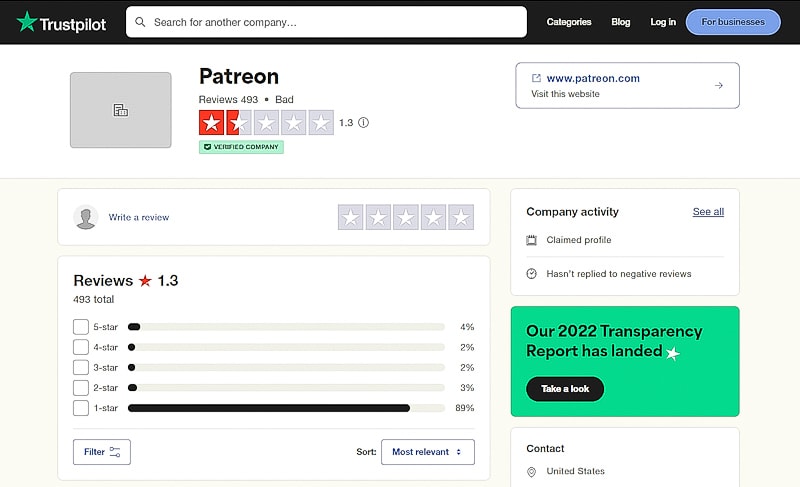
The most alarming issue I saw was this one:
Never Heard of Them!!!
Never heard of this company until they decided to take money from my account!!!!!!! Now I’ve to make a fraudulent transaction claim on my bank account because of these thieves!!!!”
Mrs. Michelle McCracken
This is more typical:
Behave as a crook site…
While I was trying to cancel an automatic renewal of 90 Euros, 10 days BEFORE the renewal date, the system rebilled my credit card for another year… 6 mails to the support were useless: they didn’t even try to correct their mistake. I’ve never seen a worst support service, but it seems to be intended. These people stole 90 euros from me. They behave as a crook site…
Jc Jcs
There are so many similar complaints that it’s hard to dismiss them all as moans and groans. They certainly have a customer complaints issue and that should be addressed.
Is Patreon Worth it? Final Thoughts
Patreon is a profitable platform for many creators and offers a way to earn extra income directly from fans. It provides a space for creators to build a community and maintain their creative freedom.
Patreon can be a valuable tool for creators who already have dedicated followers willing to pay for exclusive content, It’s particularly beneficial for creators who produce regular content and are looking for a way to monetize their work beyond the more conventional ways.
Patreon is not suited for newbies without an existing audience because Patreon is not a search platform. Success on Patreon requires proactive promotion and marketing.
Patrons must take the complaints about the platform seriously. It’s apparent that the culture behind the scenes at Patreon is uninspiring.
I suggest that paying a yearly subscription is unwise. Paying a monthly subscription will limit your troubles should a billing problem occur.
Speaking personally, I’ve been a Patron and I didn’t have any issues. I certainly feel it was value for money. I suspect that the majority of users experience the same thing. I would join again.
The creators who do well are committed to engaging with their audience and providing fresh content on a weekly basis. If that is you and you are happy to be at the center of a community, Patreon is ideal.
This is how I made a living for over 20 years. You can too, simply copy what I did – No hidden secrets

These posts will also interest you:
- Pricing Art For Beginners: Originals, Art Prints, and Formulas
- How to Get Art Commissions: The Easy Way and Make Money
- 25 Platforms for Artists to Sell Their Art Online and Make Money
- Social Media For Artists: The Best 13 Platforms for Creatives
- Are Online Drawing Courses Worth it? I Chose 5 of The Best For You!
- How to Make Prints of Your Art: A Complete Printing Guide
- 19 Ways to Make Money as an Artist Online and Off
- Is Selling Art Online Worth It? Can You Make Money?
- How to Get Paid For Drawing: 18 Ways to Make Money
- How to Make Money With Digital Art: 10 Ways to Profit
Pin For Later


Hi, I’m Kevin Hayler
I’ve been selling my wildlife art and traveling the world for over 20 years, and if that sounds too good to be true, I’ve done it all without social media, art school, or galleries!
I can show you how to do it. You’ll find a wealth of info on my site, about selling art, drawing tips, lifestyle, reviews, travel, my portfolio, and more. Enjoy